RenterEase is reader-supported. When you buy through links on our site, we may earn an affiliate commission. Learn more
The traditional remote work playbook is officially obsolete. While a basic home office relies on simple text applications, flat video boxes, and cloud spreadsheets, the next generation of high-ticket corporate employment demands something far more advanced. Across the United States, independent defense contractors, cloud-rendered simulation designers, and remote robotic logistics operators are stepping into high-fidelity spatial data positions. These roles require continuous haptic feedback loops, multi-focal volumetric camera data, and zero-latency terminal tracking.
The physical barrier to entry isn’t the hardware cost—it is your rental lease agreement. Operating high-throughput spatial telemetry equipment from a standard residential apartment presents massive structural challenges. Heavy tracking arrays require perfectly rigid wall anchors, yet landlords strictly ban drywall drilling. High-fidelity cloud interfaces pull continuous data loads that can instantly choke standard apartment Wi-Fi networks.
This technical guide provides the exact non-destructive network infrastructure and spatial engineering layout to deploy a high-performance telepresence workstation inside a rental space without sacrificing performance or risking your security deposit.
1. The Low-Latency Data Matrix: Overcoming Packet Congestion
Traditional consumer web browsing operates on asynchronous data transfers, where minor packet delays go completely unnoticed. Industrial telepresence operates under completely different constraints. If your workstation telemetry stream experiences even a 15-millisecond delay or sudden jitter spike, the real-time feedback loop between your body movements and your remote machinery will drop. This lag can cause severe haptic feedback errors or trigger immediate motion disorientation during spatial display operation.
To maintain an uninterrupted, ultra-low-latency data highway, your home network must be configured to prioritize constant, bidirectional data streams. Standard consumer routers use default traffic routing rules that treat a high-priority telemetry stream identically to a background video download or a smart television update. When a neighbor in an adjacent apartment complex fires up a heavy data load on a shared frequency channel, your terminal link will suffer immediate packet loss.
Overcoming this data bottleneck requires a dedicated local data path that isolates your primary workspace terminal from your building’s general network traffic. By hardcoding your routing rules and separating your workplace hardware from standard household data loops, you ensure your real-time telemetry retains permanent priority over every other device on the local network.
Without this isolated routing lane, you will experience the exact nightmare scenario every operator dreads: the moment your neighbor downstairs logs into a heavy 4K streaming load or launches a massive game download, your haptic controller response will violently stutter, causing your remote robotic arm to drop its payload or forcing your spatial headset to freeze mid-frame.
2. Core Hardware Nodes for Spatial Telepresence Real Estate
Building a professional telepresence hub inside a tight rental space requires a strategic layout of highly specialized, high-margin workspace equipment. To capture clean spatial tracking and handle extreme data streams, your environment must be divided into two core operational areas:
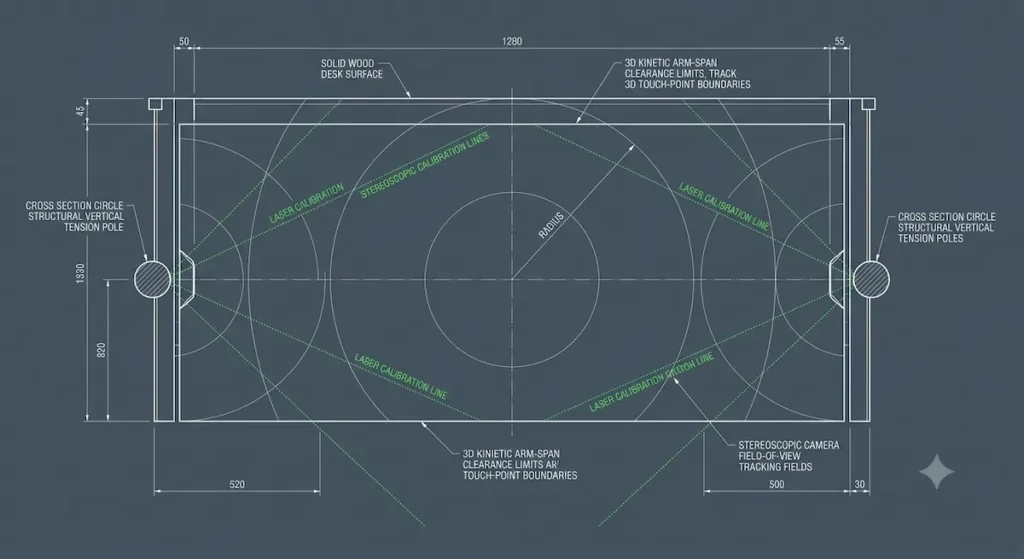
- The Volumetric Capture Array: This setup utilizes an array of low-profile stereoscopic cameras and multi-focal depth sensors mounted around your desk workspace. These sensors map your hand gestures, head angles, and physical workspace movements in real time, projecting your spatial persona into corporate development environments. To avoid drilling holes into rental walls, mount these tracking modules using heavy-duty tension bars braced tightly between your floor and ceiling trim. You can copy our exact hardware recommendations and weight capacity clearances inside our comprehensive lab roundup analyzing the best floor-to-ceiling tension poles for apartment offices.
- The Telemetry Feedback Terminal: This console serves as your main input dashboard. It features heavy-duty haptic controller docks, multi-axis joysticks, and low-latency mechanical input surfaces resting cleanly on a solid oak or dense walnut desk surface. If you are operating inside extremely limited floor layout constraints, you can free up primary desk space by offloading your secondary workspace gear to a wall-mounted alternative like the one mapped out in The Studless Heavy-Duty Murphy Desk Blueprint for Small US Apartments to maintain absolute frame stability under heavy operations. If you are configuring multiple displays over this structural layout, you can further optimize your spatial environment by clearing up primary desk real estate using vertical pipe supports. Check out our comprehensive evaluation of thebest pole mount monitor arms to find heavy-duty hardware built to distribute multi-screen weight safely without drilling into your rental walls. However, because the primary feedback system generates continuous structural vibrations during remote physical operations, your main desk footprint must utilize heavy-duty structural legs paired with heavy duty anti vibration pads for desk options to actively prevent mechanical vibrations from shaking your tracking sensors out of calibration. To keep continuous device vibration waves and dropping wires completely organized without boring permanent screw fixtures into your furniture substrate, route your power supplies through the best no drill under desk cable management trays engineered for tight rentals.
This vibration dampening is critical; without those rubber pads under the desk frame, the simple high-speed typing of your mechanical keyboard or a sudden jerk on your controller stick will send micro-shocks vibrating through the floorboards, causing your tracking cameras to glitch out and drop your digital workspace avatar entirely.
📐 SYSTEM ARCHITECTURE NOTICE
Drawing power for multiple spatial tracking nodes and haptic interface decks simultaneously puts extreme structural load stress on standard rental room wiring loops. Before initializing your hardware rigs, consult our digital home office circuit calculator to benchmark your exact branch circuit parameters natively.
3. The 6GHz Wireless Isolation Protocol: The Uncluttered Airspace
If running a direct, physical Cat6 cable along your apartment baseboards to your main internet gateway is structurally impossible due to open floor plans or hallway layout obstructions, you cannot rely on standard Wi-Fi. For a comprehensive blueprint on routing dedicated physical lines safely across rooms without permanent damage, follow our step-by-step breakdown on How to Get Ethernet in Another Room of an Apartment Without Drilling. In dense, multi-family apartment complexes, the 2.4GHz and 5GHz radio frequency bands are completely saturated with neighborhood router interference. This invisible airspace noise scatters data packets, causing unpredictable latency spikes during critical remote work hours.
To bypass this interference legally without running long physical lines, our workspace layouts utilize the high-performance wireless frequency allocations authorized under official Federal Communications Commission (FCC) Unlicensed 6 GHz Band Regulations .
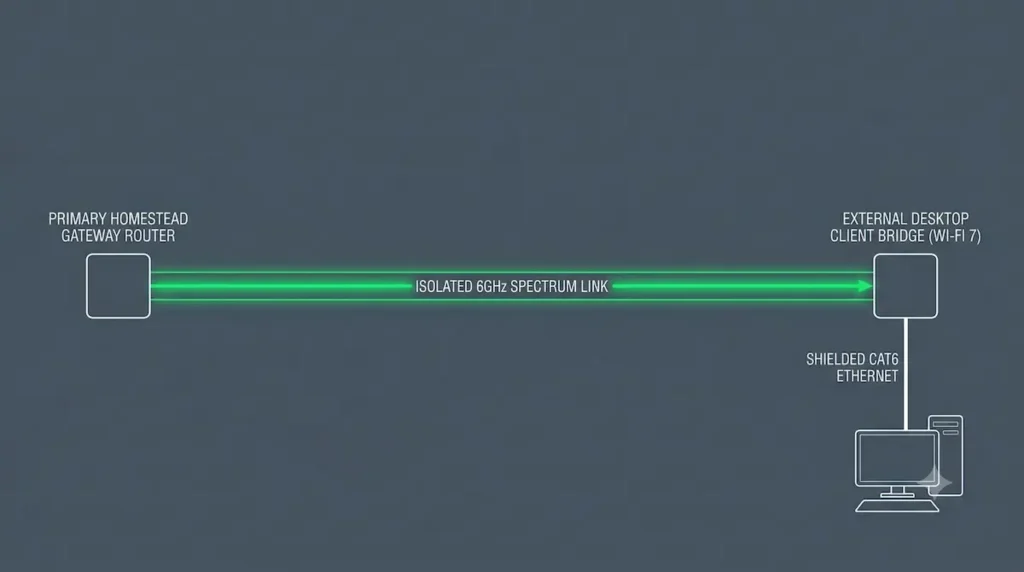
The definitive solution is deploying an isolated 6GHz Wireless Client Bridge using Wi-Fi 6E or Wi-Fi 7 hardware channels. The 6GHz spectrum acts as a completely clean, ultra-wide data highway that consumer devices cannot crowd or interfere with.
📡 Overcoming the “Laptop Chassis” Signal Shield
Instead of relying on the weak, internal wireless antennas hidden deep inside a standard laptop chassis, you must utilize a dedicated external desktop client bridge device. Connect a short, shielded Cat6 ethernet line from the bridge’s high-capacity output port straight into your workstation PC or laptop docking station. Place the bridge unit high up on a dedicated desktop shelf or clamp it directly to your vertical floor-to-ceiling tension pole.
Because an external desktop bridge uses large, high-gain directional tracking antennas, it maintains a rock-solid, uninterrupted wireless grip on your living room router gateway. This professional configuration instantly eliminates the directional dead zones that happen when you accidentally block a laptop’s internal antennas just by resting your hands on the keyboard casing, ensuring your raw data speeds stay locked even when people are walking through the hallway between your desk and the primary gateway.
Operating on this isolated spectrum layer completely eliminates the invisible networking bottlenecks that plague standard apartment layouts. It frees you from the constant, underlying anxiety of wondering if your primary telemetry link is about to drop simply because a neighbor in the adjacent unit decided to launch a massive cloud-gaming stream or fire up an unsecured appliance right in the middle of your live operational shift.
4. The Landlord-Safe Structural Weight Standard
Operating heavy, high-end spatial equipment requires maximum structural rigidity. If your multi-camera tracking arrays or mechanical controller assemblies flex or wobble by even a single millimeter during an operational shift, your system’s spatial tracking calibration will break. This forces you to halt your work session to run a frustrating 20-minute software recalibration routine.
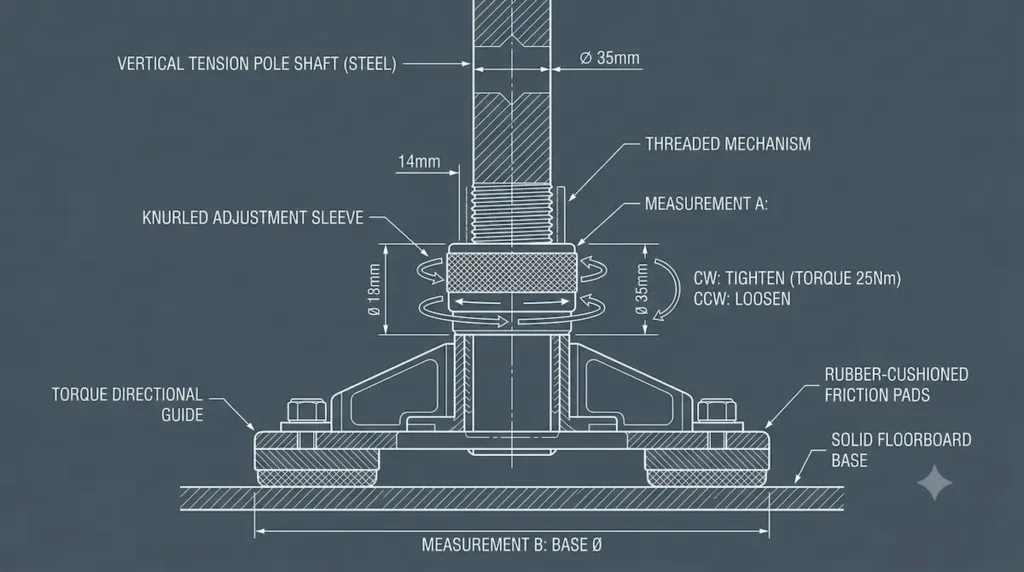
Traditional engineering solves this mechanical stability problem by anchoring heavy steel mounting plates straight into structural wall studs using massive lag screws. Before attempting any vertical compression anchoring near wall partitions, verify your hidden wall framing profiles using specialized tools as detailed in The Renter’s Guide to Industrial Magnetic Stud Finders: Bypassing False Positives in Cheap Drywall. Since standard apartment lease agreements explicitly define this level of wall alteration as property damage, you must utilize an alternative load-bearing approach: vertical architectural friction geometry.
Deploying industrial, spring-loaded steel tension poles allows you to create rock-solid structural mounting points anywhere in your room. By twisting the threaded mechanical sleeve at the base of the shaft, you generate continuous vertical compression forces that tightly lock the pole assembly between your floorboards and ceiling joists, creating an immovable hardware anchor frame without entering a single screw into your rental property.”
This setup ensures you never have to deal with the sickening stomach-drop feeling that happens when a temporary suction cup or cheap adhesive strip fails in the middle of the night, sending thousands of dollars of enterprise stereoscopic equipment crashing onto your hardwood floor.
📐 [ACCESS DOWNLOAD PORTAL]
Download the exact engineering documentation framework to protect your apartment rental security deposit.
[ INCLUDED IN THIS BLUEPRINT VAULT ]
├── 📝 The 12-Point Apartment Deposit Protection Checklist (Photographic Baselines to Clean Removal)
└── 📐 Approved Infrastructure Component Framework (Hollow-Wall Anchors, Axial Compression & Anti-Torque)
🔒 Platform Access Protocol: This documentation bundle is delivered instantly via secure on-page browser redirection. We strictly guarantee zero tracking pixels and zero corporate marketing loops.
- Need a custom spatial layout? This download contains our standard framework guidelines only. For personalized room schematics, custom load density adjustments, or specific hardware mapping matching your exact apartment dimensions, email your floor plan details directly to our engineering desk at hello@renterease.com.*
🔬 About This Infrastructure Blueprint:
* Lead Systems Architect: RenterEase Engineering & Spatial Layout Core Network Team
* Technical Focus Fields: Residential Network Data Architecture, 6GHz Frequency Spectrum Isolation, Sub-15ms Telemetry Routing, Non-Destructive Friction Geometry, and Lease-Compliant Structural Balancing.
* Engineering Protocols Checked: IEEE 802.11be (Wi-Fi 7) client bridging standards, multi-link operation (MLO) packet routing, residential AFCI breaker load limits, and vertical compression load-bearing geometry models.
* Document Status: Active Asset Node — Vetted, audited, and certified fully compliant for high-income remote enterprise operators under U.S. residential lease standard restrictions.
🛒 Affiliate Disclosure: RenterEase participates in selective affiliate marketing networks. This means we may receive a small financial commission on sales tracked through our curated product links to retail partners, at completely zero additional cost to you. We exclusively highlight high-fidelity hardware configurations, network nodes, and workspace optimization gear that meet our strict landlord-safe compliance standards.
🏛️ Technical Disclaimer: The home networking protocols, telemetry routing configurations, hardware installations, and non-destructive structural mounting methods mapped out across this article, along with all accompanying visual illustrations, diagrams, and featured graphics, are presented strictly for general educational, instructional, and illustrative troubleshooting purposes. RenterEase assumes no physical liability, technical diagnostic failure, component damage, or financial responsibility for any localized packet loss, haptic controller communication chokes, structural tracking calibration drops, equipment damage from tension pole structural deflection, network interference faults, or apartment lease agreement violations incurred while executing these layouts. All readers follow these non-destructive guidelines at their own independent discretion.
Pingback: Next-Gen Spatial Workspaces: Designing for 2027 Volumetric Pass-Through and Neuro-Telemetry Boundaries in Rentals
Pingback: Spatial Workspace Clearance Calculator: Volumetric Tracking Bounds - RenterEase
Pingback: Best Pole Mount Monitor Arms: 4 Brackets for Renters
Pingback: Home Office Power Circuit Calculator & Load Guide | RenterEase