RenterEase is reader-supported. When you buy through links on our site, we may earn an affiliate commission. Learn more
You pay for a premium gigabit fiber plan, but your Zoom calls still drop frames right when you are speaking to an executive. Your corporate connection stutters, your workflows lag, and your virtual reality headset experiences nauseating latency tracking.
If you live in a dense US apartment complex or high-rise, your Wi-Fi is fighting a losing battle. Dozens of neighboring routers are constantly screaming over the exact same wireless frequencies, choking your signal.
To get things running smoothly, you need a physical, hardwired internet line running straight to your computer. But you can’t just break out a power drill and punch holes through your rental walls to route lines across rooms—not unless you want to hand your entire security deposit right over to your landlord.
Thankfully, you don’t have to drill. This guide breaks down the best practical, renter-safe ways to bridge a rock-solid ethernet connection across your apartment using hidden infrastructure you already have.
1. The Powerline Protocol: Shifting Data Onto Existing Copper
Your apartment walls are already packed with a hidden network of copper wiring. A Powerline AV2 adapter kit taps straight into these existing electrical circuits, letting them transmit internet data between rooms so you don’t have to trip over loose cords trailing down the hallway.
The installation takes less than two minutes using two matching adapter blocks:
- The Input Node: Plug one adapter block directly into a wall socket right next to your main router gateway box. Run a short ethernet line from the router into the adapter’s port.
- The Output Node: Plug the second adapter block into a wall outlet inside your home office room. Run an ethernet line from this block straight into your workstation PC or laptop dock.
The two adapters instantly find and sync with each other through your electrical lines. This seamlessly transforms your ordinary bedroom power outlet into a high-capacity gigabit internet highway.
🎛️ The AFCI Breaker Bottleneck
Before buying a Powerline AV2 adapter kit, check your apartment’s electrical circuit breaker panel box. If your rental property was built or renovated in the United States after 2014, your electrical panel is legally required to use Arc-Fault Circuit Interrupters (AFCI breakers) under updated electrical safety mandates. As heavily detailed in safety guidelines by the U.S. Consumer Product Safety Commission (CPSC), these modern AFCI switches utilize an internal computer chip to constantly analyze electrical wave signatures for dangerous sparking faults to prevent residential fires. However, because powerline adapters send data by modulating high-frequency signals directly onto your electrical wiring, these safety switches often mistake your internet data packets for an electrical arc. This can cause the breaker to instantly trip, cutting power to your bedroom, or the breaker’s internal shielding will clean the signal, dropping your data speeds from a clean 300 Mbps down to an unusable 20 Mbps. If your panel is completely packed with AFCI switches, skip powerline adapters entirely and use the MoCA or flat cable layouts instead.
2. The Direct Clamping Rule: Bypassing Surge Protectors
The number one reason people buy powerline adapters and complain about terrible speeds or dropped connections is bad placement. If you want this to work flawlessly, you must follow the direct wall clamping rule.
Never plug a network adapter into a plastic power strip, surge protector, or extension cord.
For a clean data flow, snap the adapter directly into the primary wall outlet socket. If your desk area is already short on plugs, buy an adapter kit featuring a built-in electrical passthrough outlet. This lets you plug your multi-outlet power strip or desk lamp right over the adapter without losing a socket.
For a clean data flow, snap the adapter directly into the primary wall outlet socket. If your desk area is already short on plugs, buy an adapter kit featuring a built-in electrical passthrough outlet. This lets you plug your multi-outlet power strip or desk lamp right over the adapter without losing a socket.
🔌 The Signal-Crushing Surge Protector Trap
“Surge protectors are specifically engineered to filter out line noise and smooth out electrical fluctuations. Unfortunately, they mistake high-frequency internet data packets for electrical interference and block them entirely—instantly crushing your data speeds by up to 80%. This is why plugging your network adapter into a crowded power strip right next to a pulsing laptop charging brick or a heavy desktop monitor will almost always trigger random latency spikes mid-game or cause your Zoom audio to cut out during critical corporate calls.“
3. The MoCA Alternative: Converting Old Cable TV Jacks into Fiber Speedways
Take a close look at the baseboards in your living room and bedroom. If your apartment features old round cable TV jacks (coaxial outlets), you are sitting on an absolute networking goldmine. Multimedia over Coax (MoCA) adapters let you convert these abandoned cable lines into an ultra-fast wired network.
Coaxial cables were built for heavy-duty video data and feature dense internal metallic shielding. This shielding blocks out interference from household appliances far better than standard electrical wires.
By plugging a MoCA adapter into the wall coax jack near your router and a second one into the coax outlet behind your bedroom desk, you can pass true, uncompressed gigabit data with near-zero latency. It gives you the raw stability of a fiber line without a single drill bit touching your walls.
🔒 The Coaxial Signal Leak Hazard
Multimedia over Coax (MoCA) adapters give you raw, uncompressed gigabit stability, but they create a serious security loophole inside multi-family apartment complexes. Because all units in a dense building share a centralized coaxial cable tree running from the main utility room, your high-bandwidth data frequencies do not stop at your front door. Without physical isolation, your MoCA signal leaks right out of your wall jack, travels down the hall coax splitter network, and flows directly into your neighbor’s unit. If a neighbor plugs in a matching adapter, they are natively bridged straight onto your private local home network. To secure your workspace, you must place a physical MoCA PoE (Point of Entry) Filter directly on the main incoming coaxial line before it hits your unit’s internal splitter. If you cannot access the main splitter line behind your apartment wall panel to block this signal leak, you cannot safely run a MoCA network without exposing your local data traffic to the building.
4. Symmetrical Wi-Fi Bridges: Overpowering the Congestion
If your building’s electrical circuits are ancient and your landlord painted right over the old coaxial wall plates, your next best option is a dedicated wireless client bridge. Do not confuse this with a standard mesh router node.
A standard mesh node receives and repeats wireless signals through the air, which instantly doubles your latency and lag. A dedicated client bridge uses a high-end standalone Wi-Fi 6E or Wi-Fi 7 router locked exclusively onto the uncrowded, pristine 6GHz radio frequency band.
📡 Overcoming the “Laptop Chassis” Signal Shield
Instead of relying on the tiny, weak wireless antennas hidden inside your laptop chassis, you place the bridge device right on your desktop shelf. Connect a short ethernet cord from the bridge’s output port straight into your PC. Because the bridge uses large, high-capacity external antennas, it maintains a rock-solid uninterrupted data grip on your living room router. This setup instantly eliminates the frustrating directional dead zones that happen when you accidentally block your laptop’s internal antennas just by resting your hands on the keyboard casing, ensuring your raw data speeds stay locked even when people are walking through the hallway between your desk and the primary gateway.
🔒 Lock In Your Zero-Damage Network Infrastructure Blueprint: Routing high-performance category data cabling through multi-room apartment floor plans frequently forces renters into catastrophic lease violations like cutting baseboards or drilling through rental drywall partitions. Don’t risk losing your tenant security deposit or paying expensive drywall repair fees just to secure stable, low-latency gigabit speeds. Drop your email below to instantly secure the master RenterEase Spatial Infrastructure Manual (PDF) . This engineering field guide shows you exactly how to map clean multi-room cable pathways, deploy non-destructive flat-wire retention links, and exploit hidden structural runs safely without drilling a single permanent hole into your property . If you are dealing with a non-standard hallway vertex or an awkward door threshold, you can query our staging desk directly at hello@renterease.com for a custom engineering review
5. Baseboard Compression Tracks: The Invisible Cat6 Runner
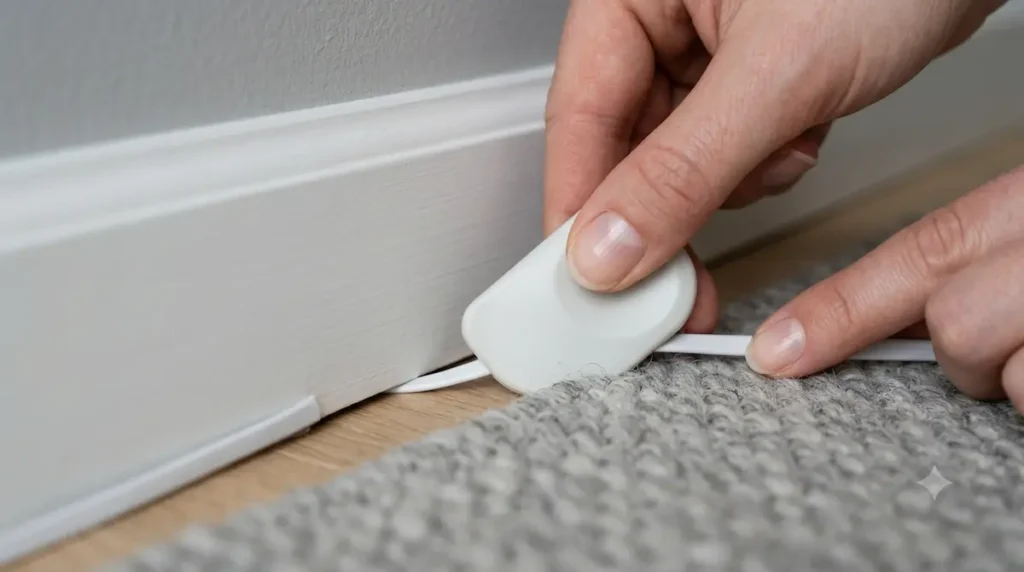
If you are a purist who refuses to use adapters and demands a true, unbroken Cat6 ethernet line from the router straight to your desk, you still don’t have to break your lease agreement. You just need to hide the line completely out of sight without staples or industrial tape.
To do this, pick up a flat ethernet cable—these are engineered to be less than 0.08 inches thick.
Grab a stiff plastic putty knife or a credit card, and gently tuck the flat cord straight into the narrow expansion gap sitting between your carpet’s tack strip and the wooden baseboard molding.
The cable slides completely beneath the fabric perimeter line, keeping it perfectly invisible, protected from vacuum cleaners, and safe from tripping hazards. This ensures your high-speed wiring grid doesn’t interfere with your spatial layout or compromise your safety parameters—critical rules we map out in our core blueprints for maintaining optimal walking path clearance guidelines for small bedrooms. When it’s time to pack up and move out, simply pull the cable out smoothly. The wood and drywall remain completely pristine, guaranteeing you get your security deposit back in full., keeping it perfectly invisible, protected from vacuum cleaners, and safe from tripping hazards. When it’s time to pack up and move out, simply pull the cable out smoothly. The wood and drywall remain completely pristine, guaranteeing you get your security deposit back in full.
📌 The Carpet Tack-Strip Needle Hazard
Tucking a flat Cat6 ethernet runner into the narrow expansion gap beneath the baseboards keeps your layout flawless and hidden, but it requires extreme mechanical care to prevent instant cable destruction. Standard US wall-to-wall carpet installations hold fabric tension using sharp wooden tack strips nailed to the subfloor right next to the wall perimeter. These strips feature hundreds of upward-pointing steel needles designed to grip the rug backing. If you jam a flat ethernet cord into this channel using a blunt tool or force it down carelessly, you will press the thin cable jacket straight against these exposed metal needles. The teeth will pierce right through the soft insulation layer, slicing the microscopic internal copper data pairs and causing immediate packet loss or a completely dead line. Work slowly using a dull, smooth plastic wedge, ensuring the wire rests completely flat against the baseboard wood casing rather than riding up over the carpet tack needles.
The Landlord-Safe Compliance Standard
Before ordering your networking hardware, run a quick manual check on your apartment’s physical layout to avoid returns:
- If you are choosing Powerline adapters, ensure your bedroom and living room outlets actually run through the same central circuit breaker panel, or the adapters won’t be able to talk to each other.
- If you are choosing MoCA adapters, look inside the coaxial jacks with a flashlight to ensure the center copper pins are straight and haven’t been caked over with layers of rental paint.
- When tucking flat ethernet cables under baseboards, work slowly to prevent kinking or tearing the internal copper threads around sharp doorframe corners.
Once your high-capacity data line arrives safely at your main workstation terminal node, you will need to consolidate your hardware cords cleanly underneath your desktop surface without breaking your property lease parameters. Check out our real-world testing roundup of the best no drill under desk cable management trays to tuck away heavy adapters entirely out of sight.
🏛️ About RenterEase: As an elite spatial engineering publication, RenterEase is dedicated exclusively to helping remote professionals, immersive tech users, and apartment renters transform standard compact floor plans into high-efficiency production hubs . By auditing multi-functional furniture layouts, evaluating multi-room network pathway clearance thresholds, and mapping out non-destructive structural media routing alternatives, our layout specialists remove the constraints of working within constrained urban layouts . Every hardwired data line analysis, surface-safe integration guide, and hardware deployment layout across our repository is rigorously optimized to elevate your local networking speeds, maintain absolute lease compliance, and fully insulate your tenant security deposit from structural property damage .
Affiliate Disclosure: RenterEase participates in selective affiliate marketing networks. This means we may receive a small financial commission on sales tracked through our curated product links to retail partners, at completely zero additional cost to you. We exclusively highlight high-fidelity hardware configurations, network nodes, and workspace optimization gear that meet our strict landlord-safe compliance standards.
🏛️ Technical Disclaimer: The home networking protocols, physical hardware installations, flat-cable routing trajectories, and non-destructive wire concealment methods mapped out across this article, along with all accompanying visual illustrations, diagrams, and featured graphics, are presented strictly for general educational, instructional, and illustrative troubleshooting purposes. RenterEase assumes no physical liability, technical diagnostic failure, structural property damage, or financial responsibility for tripped AFCI breakers, signal-crushing hardware chokes, carpet tack-strip puncture wounds, cable insulation degradation, baseboard adhesive paint damage during removal, or apartment lease agreement violations incurred while executing these physical layouts. All readers follow these non-destructive guidelines and route data lines at their own independent discretion.
Pingback: Telepresence Home Office Setup Guide for Remote Operators
Pingback: Next-Gen Spatial Workspaces: Designing for 2027 Volumetric Pass-Through and Neuro-Telemetry Boundaries in Rentals