RenterEase is reader-supported. When you buy through links on our site, we may earn an affiliate commission. Learn more
Choosing a sleek standing desk or adjusting the perfect mounting angle for a triple-monitor setup feels like the hard part of building a high-performance home office. But if you are a remote software engineer, data scientist, or system architect squeezing a dense stack of hardware into a standard rental, you are likely driving right toward an invisible, frustrating bottleneck: tripping your bedroom circuit breaker mid-work block.
Most traditional internet buying guides tell you to just look up the wattage numbers stamped on your phone chargers, add them up on a scratch pad, and call it a day. That surface-level advice completely ignores how residential electrical loops handle continuous, heavy loads over long hours of compute time. Even if you deploy one of the 10 best narrow desks for small apartments to solve your immediate physical floor plan footprint constraints, loading that slim frame with hardware concentrates immense infrastructure pressure on a single wall loop. If your command pod packs a deep learning home lab server, an external graphics card array (eGPU), multiple 4K studio displays, and a dual-motor electric standing desk, you are pushing standard residential wiring past its design limits. If you are planning to host a dedicated local AI server home lab, it is crucial to calculate dynamic transient power spikes alongside basic hardware draws to prevent unexpected blackouts completely.
To keep your expensive hardware safe from sudden blackouts, prevent data corruption, and protect your tenant security deposit from electrical system damage, you need to understand the strict mathematical rules governing the circuit breaker panel hidden behind your drywall.
1. The 15-Amp Ceiling: Why Standard Rentals Face Office Power Failures
Most residential apartment bedrooms in the United States are wired on a single, shared 15-amp circuit breaker operating at a standard 120-volt baseline. If you use basic electrical physics to multiply 15 amps by 120 volts, you get a hard structural maximum ceiling of 1,800 watts total capacity.
The split-second your concurrent equipment power demand crosses that 1,800-watt marker, the bi-metallic switch inside your main electrical panel instantly snaps open. The current cuts off to every single plug on that loop to prevent the copper wiring inside the walls from overheating and creating a fire hazard. If you are mid-compilation or running a deep rendering pipeline when this happens, your machine goes black instantly.
The 80% Continuous Load Safety Threshold (The 1,440-Watt Rule)
The biggest mistake remote workers make is assuming they can safely idle their gear right up against that 1,800-watt limit. According to the National Electrical Code (NEC), any appliance or hardware array that draws power continuously for three hours or more is classified as a continuous load. Under these parameters, you are legally and structurally required to respect the 80% Continuous Load Safety Rule. To verify how these limits prevent high-load friction hazards across residential properties, you can cross-reference the voluntary electrical compliance matrices maintained by the U.S. Consumer Product Safety Commission. For a standard 15-amp apartment circuit, your actual safe continuous operating limit is capped at 12 amps, which translates to exactly 1,440 watts.
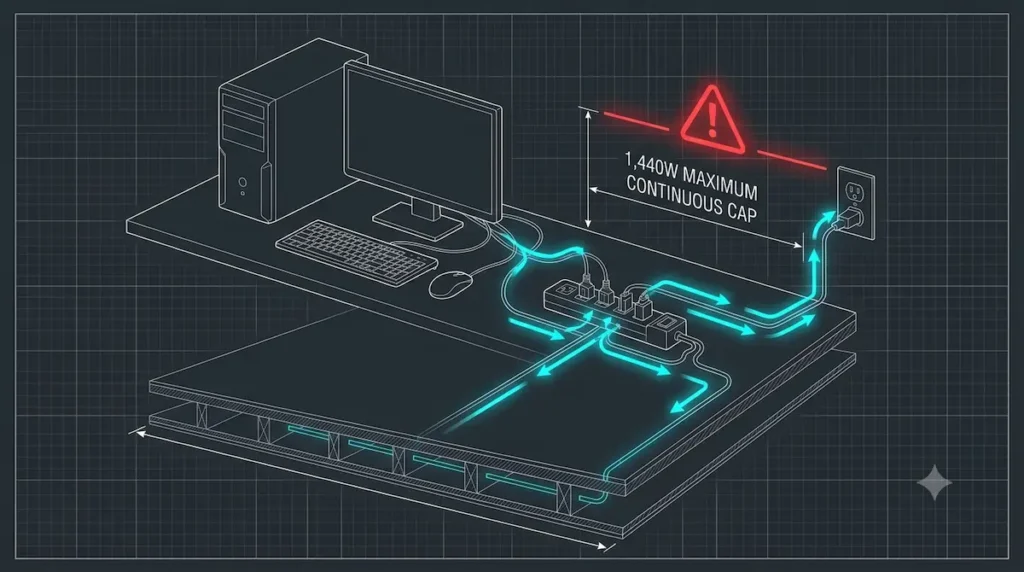
If your high-end workstation idles at a constant 1,500 watts while you code throughout the day, the breaker switch inside the panel won’t trip immediately. Instead, it will slowly bake and heat up over a two-to-three-hour window. Eventually, it hits its thermal trip point and snaps open without warning, dropping your connections and killing your data arrays right in the middle of your most productive focus hours.
Motorized Sways vs. Static Machine Idle Draws
To balance your room’s power profile, you have to separate your stable background power draws from sudden, aggressive voltage spikes:
- Static Machine Idle Draws: These are your predictable, long-running power draws. Your workstation computer core running database tests, your network-attached storage (NAS) boxes spinning up, and your multi-display setups maintain a relatively steady baseline current.
- Motorized Lifting Sways: The electrical demand shifts dramatically the exact moment you activate an adjustable standing desk frame. The heavy lifting columns draw a sudden 200W to 300W peak surge to hoist your heavy desktop slab, which can trigger an immediate voltage drop if your circuit loop is already running close to full capacity. Beyond this electrical strain, the sudden mechanical motion also throws high-frequency structural hums down into your flooring joints, which is exactly why deploying the best heavy duty anti-vibration pads for desks is a crucial secondary strategy to isolate those physical motor hums and protect your apartment floorboards from dynamic friction wear while you manage your power constraints.
If your computing rig and studio screens are already drawing a continuous 1,300 watts from the wall, hitting the desk lifting button will instantly push your total room draw past the 1,440-watt safety margin and hit the breaker’s limit point, causing an immediate blackout.
2. Infrastructure Staging: How to Split Heavy Payloads Across Separate Circuits
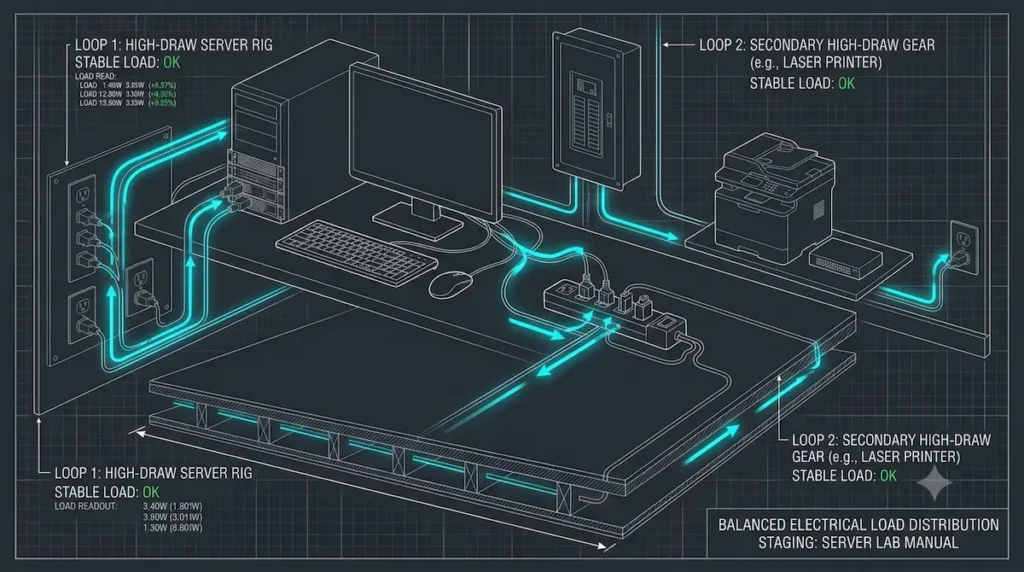
If your electrical layout configurations are approaching the danger zone, you don’t necessarily have to downsize your computer hardware components. Instead, you need to implement a smart physical staging plan to safely split your operational load across separate, built-in circuit lines inside your rental unit.
Bypassing the Laser Printer Inrush Voltage Spike
Laser printers are notorious hazards for sensitive home computing setups. Unlike low-draw inkjet variants, a laser printer uses a physical thermal fuser core that requires sudden, violent bursts of electrical heat to melt toner powder onto paper sheets. The exact split-second you click print, the machine triggers a massive 800-watt to 1,000-watt inrush voltage spike.
If your printer is chained into the exact same wall outlet run as your development server or desktop rig, this sudden structural load can pull current away from your computer’s power supply unit (PSU). The resulting brownout causes a quick dip in line voltage, triggering sudden system reboots or hardware resets. To bypass this, always route your printer to a completely separate room circuit, or keep it isolated entirely from your primary work session power path.
Integrating a Line-Conditioning Battery Backup (UPS) Core
To completely insulate your equipment from micro-wobbles in building current, you should place a line-interactive Uninterruptible Power Supply (UPS) between your wall outlet and your gear. This type of high-density surge mitigation layout is essential when routing clean infrastructure loops for a premium telepresence home office setup guide layout framework. A premium UPS handles two critical defensive jobs:
- Continuous Line Conditioning: It automatically balances minor brownouts or high-voltage spikes caused by outdated apartment wiring, smoothing the electrical feed without constantly draining your internal battery cells.
- Instant Dynamic Buffering: If your dual-motor standing desk legs or local appliances cause a temporary power dip, the UPS battery core covers the strain instantly. This protects your rendering pipelines and storage drives from hardware stress.
3. The 3-Step Test to Secure Your Apartment Workspace Electricity
To ensure your home setup remains completely landlord-compliant and stable under peak execution loads, follow this practical 3-step validation routine:
- Step 1: The Circuit Mapping Test: Unplug your expensive workstation equipment, locate your apartment’s main circuit breaker box, and turn the bedroom switch completely off. Take a small phone charger and test every single wall socket in your room. Write down exactly which outlets are dead and check if any plugs on the opposite wall or out in the hallway are still live. If you find a live plug nearby, it is running on a completely separate breaker line, giving you the perfect secondary channel to distribute your load.
- Step 2: Smart Load Balancing Layout: Position your heavy hardware assets based on your step 1 map. Run your main computer core and dual-display mounts from the primary bedroom wall sockets. If you are leveraging heavy structural mounts—like 4 best floor-to-ceiling tension poles to suspend monitor arrays or spatial tracking cameras off the floor layout lease-safely—make sure you route their separate auxiliary utility lines away from your main machine breaker loop. This balances your total wattage, keeping both lines well below the 80% continuous safety limit.
- Step 3: The Peak-Load Safety Sweep: Once your distribution layout is organized, test your setup under maximum strain. Power on your complete computer stack, turn your display screens to full brightness, and trigger your adjustable standing desk frame to raise to its highest position all at the same time. Check your breaker box to confirm the circuit handle remains completely cool and steady, securing your home office safety for your daily work schedule.
4. Decoding the Diagnostic Output Tiers
Once you enter your active hardware array parameters and input your operational email to clear the decryption lock, the calculator matrix outputs three specific technical safety ratings. These zones are calculated using continuous amperage thresholds rather than temporary peak limits:
🟢 1. The Secure Zone (Under 1,440 Watts / 12 Amps)
- What it means: The electrical draw is completely safe .
- The Physics: Residential building codes require that you never load a circuit past 80% of its total capacity if you are running devices for 3 hours or more (called a “continuous load”). For a standard 15-amp apartment breaker, that safe 80% ceiling is exactly 1,440 watts (12 amps). Staying under this number means the wiring stays cool and perfectly secure.
🟡 2. The Warning Zone (1,441 – 1,800 Watts / 12 to 15 Amps)
- What it means: The circuit is overloaded for long-term use, but it won’t pop immediately .
- The Physics: The devices are drawing more than the 80% continuous safety rule allows. While a 15-amp breaker can handle up to 1,800 watts for short bursts, running a heavy workstation here for hours will cause heat to build up inside the wall wires and the breaker panel, slowly wearing out the infrastructure.
🔴 3. The Critical Zone (Over 1,800 Watts / 15+ Amps)
What it means: Immediate danger of snapping the power off.
The Physics: A standard apartment bedroom outlet loop maximizes out at exactly 1,800 watts (15 amps) total capacity. Consequently, exceeding this threshold pushes the system past its absolute physical limits. For example, the exact moment a dual-motor standing desk lifts or a high-draw printer fires up, a sudden energy spike occurs. Therefore, the internal circuit breaker will instantly trip to stop a house fire.
5. Bypassing the Infrastructure Bottleneck Completely
Squeezing enterprise-grade remote work hardware into generic residential floor plans doesn’t mean you must throttle your performance. However, you do need to manage your system intelligently. By treating your apartment’s power grid as a finite boundary, you can actively split your load across separate circuit breakers. As a result, you protect your physical investments while keeping your workspace completely lease-compliant.
The fields pre-loaded below reflect standard baseline hardware specifications. Therefore, you can fully customize and change any of these numbers. This allows you to calculate your precise room load signature.
Once your diagnostics run, copy your values. Next, drop our team a message at hello@renterease.com to request your downloadable workspace staging package.
About the Engineering Curation Desk
RenterEase is an independent architectural workspace lab managed by remote software infrastructure designers. We analyze home office setups through the strict lens of electrical load physics, spatial tracking calibration, structural load distribution, and damage-free apartment property integration.
By bypassing superficial lifestyle decor trends and generic layout advice, our staging team provides raw, data-dense technical blueprints engineered to protect both your daily physiological work performance and your long-term tenant security deposit.
Affiliate Disclosure & Property Compliance Policy
RenterEase is a data-dense, reader-supported platform built on absolute structural transparency. When you deploy workspace infrastructure assets, line-conditioning battery backup cores (UPS), or lease-safe smart load distribution setups through the curated links across our technical manuals, we may earn a localized tracking commission from our retail partners at completely zero additional cost to your account.
We exclusively analyze and highlight rigid, non-destructive circuit staging systems and electrical safety hardware that meet our strict independent engineering standards for complete subfloor protection and landlord-compliant property restoration. Learn more in our global Terms of Use & Product Liability Disclaimers.
⚠️ Product Liability & Electrical Load Disclaimer
The load-distribution formulas, amperage conversion metrics, circuit safety margins, and multi-outlet staging layouts detailed across this manual and our interactive diagnostic calculator widget tool are compiled strictly for general educational and informational purposes. RenterEase does not provide professional electrical engineering services, certified electrical inspections, or licensed residential contracting advice.
Actual residential subfloor wiring tolerances, breaker box performance conditions, 15-amp switch condition levels, and local utility electrical fluctuations differ significantly across apartment buildings and properties. The installation of aftermarket uninterruptible power supplies (UPS), heavy-duty computer server hardware arrays, line conditioners, or extension cable runs is executed entirely at the user’s individual risk.
RenterEase, its technical infrastructure editors, and its parent entities accept completely zero financial liability or legal responsibility for tripped breakers, localized short circuits, appliance data loss, component wear, building wire overheating, or any tenant security deposit deductions incurred during independent room modifications. Always cross-reference your specific computing hardware power factors against your rental lease utility terms and your physical building panel ratings.
Pingback: 10 Best Narrow Desks for Small Apartments (2026 Space Picks)
Pingback: Telepresence Home Office Setup Guide for Remote Operators
Pingback: 5 Best Floor-to-Ceiling Tension Poles for Apartment Offices (2026 Picks)
Pingback: How to Stop Desk From Shaking on Carpet (Lease-Safe Fixes)
Pingback: How to Choose a Standing Desk Floor Protection Mat Guide
Pingback: Local AI Server Home Labs: Rental Cooling & Spatial Blueprint