RenterEase is reader-supported. When you buy through links on our site, we may earn an affiliate commission. Learn more
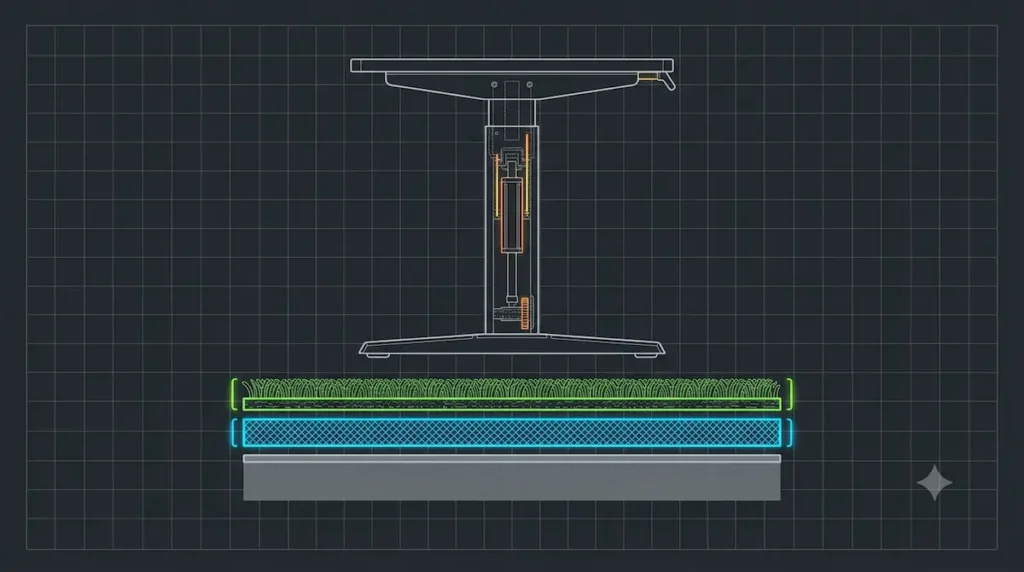
📐 INFRASTRUCTURE BLUEPRINT BREAKDOWN: THE THREE-LAYER VARIANCE
- Floating Load Column: The center engineering vector outlines the desk leg assembly shifting its center of mass upward, creating a high-leverage pendulum effect.
- Layer A (Green Surface Pile): The top carpet fiber loops. This layer provides zero mechanical resistance and hides structural leveling hazards beneath the feet.
- Layer B (Blue Elastic Padding Matrix): The compressible foam underlayment. This acts as a microscopic trampoline spring, absorbing your typing energy and bouncing it back up your desk legs as a lateral sway.
- Layer C (Solid Subfloor Foundation): The immovable concrete or wood subfloor structure. This is the absolute target baseline where your desk must transfer its weight load to achieve 100% stillness.
Learning how to stop desk from shaking on carpet is a major milestone for remote home setups. Thick apartment carpet padding creates a highly unstable foundation. Your entire desktop shifts when you type rapidly. This continuous macro wobble introduces heavy physical strain on your arms. It can also throw sensitive telemetry hardware completely out of calibration.
But if you are living in a standard US apartment, you are likely dealing with plush, wall-to-wall carpeting backed by a thick foam underlayment. While this soft layering keeps your feet warm and dampens footstep noise for the tenants downstairs, it acts like a compressible sponge beneath a heavy workstation.
The moment you type rapidly on a mechanical keyboard or lean forward to adjust your displays, the entire frame shifts. This continuous macro desk wobble isn’t just a mild visual distraction; it introduces continuous physical strain on your arms and can easily throw sensitive optical hardware out of calibration.
To lock your frame into absolute stillness, you must systematically eliminate the spongy foundation below your desk feet. This guide outlines the engineering principles and lease-safe hardware fixes required to solve how to stop desk from shaking on carpet once and for all.
1. The Physics of Carpet-Induced Desk Wobble
To fix a shaking desktop, you must first understand the structural mechanics causing the instability. Desk frame movement on soft surfaces stems from three distinct environmental variables:
- Point-Load Compression: A standard computer desk, loaded with a computer tower, monitor arms, and desktop gear, weighs anywhere from 80 to over 150 pounds. This entire load path is distributed exclusively across the small surface area of four tiny adjustment feet. These concentrated points crush the carpet pile and sink unevenly into the foam padding below.
- The Spongy Foundation Effect: Because foam underlayment is highly elastic, it behaves like a mattress spring. When you move your arms, the foam compresses on one side and expands on the other, creating a continuous lateral sway that increases in intensity the higher your desktop is raised.
- Leverage Sways (Standing Desks): If you use a height-adjustable frame, raising the work surface moves your center of gravity farther from the floor. This increased leverage multiplies microscopic ground movements into massive desktop sways.
2. How to Stop Desk From Shaking on Carpet: 4 Lease-Safe Fixes
When you ask a general contractor how to stop a heavy structure from shaking, their immediate answer is to anchor the framing directly into the room’s wall studs or drive lag screws straight through the flooring. But as a renter, you do not have that luxury. Every hole you drill is a direct threat to your security deposit and a guaranteed awkward conversation with your property manager during the move-out inspection.
To achieve absolute, rock-solid desktop stillness without altering a single square inch of your apartment, you have to work with the layout constraints you already have. These four non-destructive strategies target the root mechanical issues of carpet-induced sway while keeping your lease agreement perfectly safe.
Strategy A: Level the Horizon with Rigid Hard-Plastic Shims
Many apartment residents make the mistake of shoving a folded piece of cardboard, thick felt, or a soft rubber wedge beneath a low desk leg to stop a wobble. While this might temporarily balance a table on a solid wood floor, it backfires completely on a carpeted surface. Soft materials compress unevenly under real-world workflow weight, essentially adding a second tiny mattress spring underneath your desk’s factory glides.
If your desk sits near the edge of a room, its back legs are likely resting on the elevated carpet tack strip running along the baseboard, forcing the entire frame to lean slightly forward.
To fix this, slide rigid, heavy-duty hard-plastic interlocking wedges directly under the lower front desk glides. Hard plastic possesses immense structural compressive strength. It provides an unyielding, flat baseline that bridges the gap between your desk glide and the floorboards, cutting off front-to-back rocking sways instantly.
Strategy B: Pierce the Foam with Screw-In Carpet Spikes
If you are using a heavy standing desk, leveling your frame won’t stop the deep, lateral sway caused by the soft foam padding beneath your feet. To freeze your desktop at a high standing layout, you have to bypass the padding completely. The most effective way to do this is to swap out your flat factory leveling feet for heavy-duty steel standing desk carpet spikes.
When evaluating how to stop desk from shaking on carpet, these spikes are a complete structural game-changer. They utilize long, smoothly tapered metal points that screw straight into your desk’s existing M8 or 3/8-inch bottom leg sockets.
When you place the desk down, these points slice cleanly between the individual woven loops of your carpet pile. The weight of your monitors and computer tower pushes the spikes all the way through the spongy foam layer until they rest firmly against the solid plywood or concrete subfloor.
Because the spikes merely part the woven fibers rather than cutting or tearing the fabric, they leave zero permanent track marks. The moment you lift the desk to move out, the carpet loops naturally snap back into place, completely hiding the evidence from your landlord.
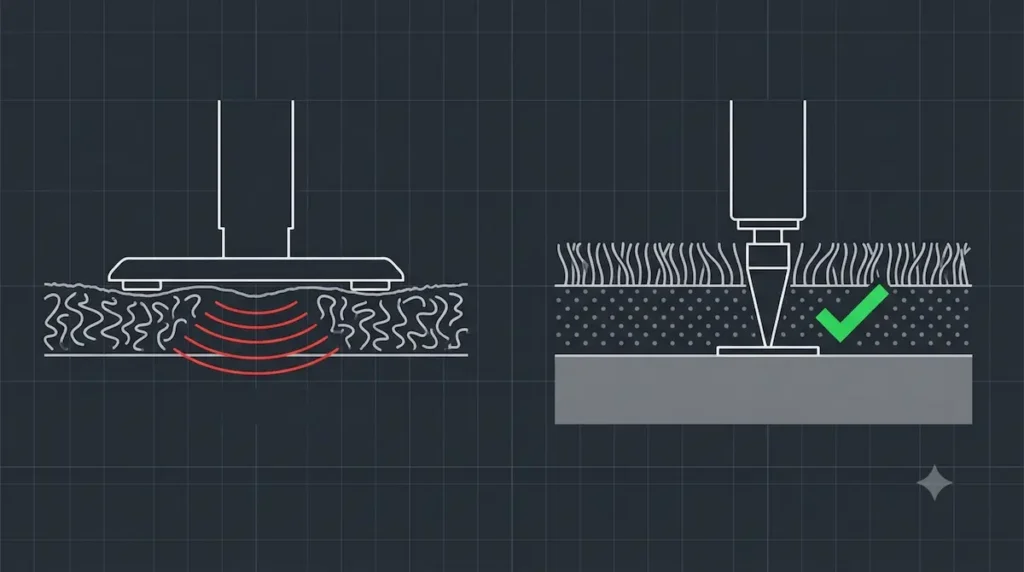
🔬 MECHANICAL COMPARISON ANALYSIS: POINT-LOAD STABILIZATION
- The Left Flaw (Carpet Deformation Loop): Resting a flat factory glide on plush carpet forces the heavy desktop mass to distribute unevenly across the foam underlayment. The soft material flexes under weight, amplifying arm-movement into macro monitor sways.
- The Right Fix (Subfloor Spike Grounding): Swapping factory feet for smoothly tapered steel carpet spikes bypasses the elastic padding entirely. The needle points slide cleanly between woven loops to lock the desk base directly onto the solid gray subfloor structure—completely neutralizing lateral wobbles without damaging a single fiber.
Strategy C: Disperse the Load Using 3/4-Inch Plywood Platforms
If your rental apartment features low-quality, thin loop carpeting, using metal spikes might risk scratching a delicate wood subfloor underneath. In this specific scenario, your goal shifts from piercing the padding to distributing your setup’s weight so widely that the foam underneath cannot compress.
Never place small, narrow furniture cups directly onto a plush rug; their tiny footprint will still sink and wobble.
Instead, construct a dedicated load-bearing foundation by placing a solid 3/4-inch thick premium plywood panel or a heavy, rigid polycarbonate chair mat directly under your desk’s leg framework.
Broadening the contact footprint forces your workstation’s heavy downward pressure to distribute evenly across thousands of individual carpet fibers simultaneously. This massive surface area distribution keeps your desk feet sitting flat on top of the pile, completely neutralizing the lateral sponge effect during frantic typing blocks.
Strategy D: Absorb Micro-Shocks with Dense Composite Shims
Sometimes, the shaking you feel isn’t a slow, rolling sway—it is a continuous, high-frequency vibration that travels up from your fingers into your monitors every time your mechanical keyboard switches click. If you are a fast typist or use a dual-motor standing frame, your muscle movements create kinetic wave paths that bounce off your floorboards and travel right back up your desk legs.
To break this physical feedback loop, you must isolate your hardware using material science. Prolonged typing on an unstable, vibrating surface doesn’t just impact your equipment; it increases physical contact stress across your wrists and forearms.
To maintain healthy physical alignment, your setup should support the neutral typing postures outlined in the official OSHA Computer Workstations eTool.
Migrate your desk legs or load plates onto high-performance structural shims, as detailed in our comprehensive review of the Best Heavy Duty Anti-Vibration Pads for Desks.
Deploying dense, multi-layered rubber-and-cork composite pads creates an acoustic barrier beneath your frame. These pads trap and dissolve microscopic physical energy sways laterally before they can travel down your desk legs, giving you a completely silent, distraction-free typing window.
3. A Tuning Checklist to Stop Desk From Shaking on Carpet
Sometimes, the root cause of desktop movement isn’t just the soft flooring layout beneath your feet—it is a lack of mechanical tension inside the furniture assembly itself. If your frame’s internal structural joints have even a millimeter of play, the soft carpet pad will magnify that tiny rattle into a massive, frustrating sway.
Before investing in extra dampening hardware or ordering custom spikes, step up to your workspace terminal and execute this definitive, human-centric mechanical tuning protocol:
Step 1: Torque Down Your Leg-to-Frame Fasteners
Flat-pack home office desks naturally loosen over time. Every single hour you spend resting your forearms on the desktop, typing vigorously, or leaning against the front edge introduces continuous, microscopic back-and-forth leverage forces. This everyday movement slowly backs structural bolts out of their factory threads.
Clear your desktop gear out of the way, crawl underneath your desk frame with a hex wrench, and systematically verify every single structural connection point. Tightening the primary frame-to-leg bolts until they are completely rigid eliminates the internal wiggle room that carpet foundations love to exploit.
Step 2: Drop Your Setup’s Center of Mass
If you house a heavy, multi-fan desktop computer tower, your immediate instinct is to place it proudly on top of your beautiful desktop surface to show off the lighting and custom components. However, placing a 30-to-40-pound metal enclosure three or four feet above a soft carpet padding foundation creates a massive physics bottleneck. It shifts your setup’s center of gravity drastically upward, turning your computer case into a literal pendulum lever that forces the desk frame to swing violently at the slightest human touch.
To instantly stabilize your frame, move your heavy computer tower off the top work surface. Migrate it onto a dedicated rigid stand directly on the floorboards, or anchor it tight against the lowest baseline of the desk leg frame. Dropping your setup’s mass down toward the floor line minimizes leverage sways instantly, keeping your displays rock-solid during intense production runs.
⚠️ TECHNICAL DIAGNOSTIC NOTE
Managing heavy workstation hardware arrays requires balancing your electrical system load alongside your physical weight distribution. Before running full computational workloads on your repositioned machine towers, consult our home office circuit calculator to ensure your system’s concurrent amperage draw does not cross safe residential safety limits.
Step 3: Audit Your Workspace Boundaries
If you are running advanced, high-fidelity spatial gear or dual-motor height-adjustable frames that experience intense physical shifts, standard furniture wedges are only half the solution. You must evaluate how your layout interacts with the structural partitions of your apartment.
If you are dealing with a heavily restricted micro-apartment space where pulling the desk forward into a clear room axis isn’t an option, you must look into structural stabilization alternatives. Review the precise structural load tolerances and wall distribution mechanics detailed inside our custom Studless Heavy-Duty Murphy Desk Blueprint to brace dynamic workspace weights safely without breaking lease rules or drilling into wall studs.
“By combining proper weight distribution with rigid hard-plastic shims or carpet-penetrating spikes, you can achieve a perfectly level, completely stable workspace on any carpeted apartment floor—giving you the definitive answer on how to stop desk from shaking on carpet while keeping your focus sharp and your rental security deposit entirely intact.”
┌──────────────────────────────────────────────────────────────────────────┐
│ 📥 DOWNLOAD THE LANDLORD-SAFE INFRASTRUCTURE ASSURANCE VAULT │
│ │
│ Protect your rental space and lock your setup into absolute stillness. │
│ Enter your enterprise email below to instantly receive the official │
│ dual-documentation package: │
│ │
│ 🛡️ MODULE 1: The Apartment Deposit Protection Checklist │
│ 📐 MODULE 2: The Approved Infrastructure Component Framework │
🎨 About This Infrastructure Blueprint
Custom Layout Support: If you require a specialized, data-dense analysis tailored to your specific apartment floor plan or complex standing frame layout, please contact our staging helpdesk directly at hello@renterease.com.
Lead Systems Architect: RenterEase Engineering & Spatial Lab
Core Curation Focus: This stabilization manual was engineered by the mechanical architecture team at RenterEase.com. We combine advanced structural weight distribution principles with strict residential rental compliance guidelines to help high-performance software engineers and remote operators freeze their physical desktops in place without risking their security deposits.
🛒 Affiliate Disclosure & Engineering Curation Policy
RenterEase is a data-dense, reader-supported platform. When you purchase workspace gear or stabilization hardware through the curated links in this article, we may earn a small financial commission from our retail partners at completely zero additional cost to you. Clear transparency matters to our lab: our reviews are governed by strict mechanical testing protocols, completely independent of vendor influence. For this carpet stabilization manual, we exclusively highlight high-compressive shims, non-destructive floor platforms, steel standing desk carpet spikes, and dense composite isolation mounts that meet our strict damage-free rental compliance standards. Learn more in our global Learn more in our global Terms of Use & Product Liability Disclaimers.
⚖️ Technical Disclaimer & Liability Limitation
The interactive calculations, carpet stabilization strategies, weight distribution metrics, structural hardware configurations, and mathematical formulas mapped out across this article, along with all accompanying conceptual photography, 3D wireframes, spatial diagrams, and blueprint illustrations, are presented strictly for general educational, informational, and illustrative inspiration purposes.
RenterEase assumes no physical liability, structural property damage, furniture frame collapse, computer hardware damage, monitor screen cracks, wireless telemetry lag, carpet pile tears, subfloor deep-scratching, or financial responsibility for incorrect real estate measurements, over-torqued bolts, imbalanced setup weights, structural tack strip degradation, or wall-scuffing during the installation of spikes, load distribution plates, or mechanical shims. All readers measure structural floor space, pull setups away from walls, insert structural shims, install carpet-penetrating speaker spikes, and modify workspace furniture frameworks entirely at their own independent discretion, judgment, and risk.
Pingback: Heavy Duty Anti Vibration Pads for Desk: 4 Top Picks
Pingback: How to Mount a Heavy Duty Murphy Desk on Drywall Without Studs
Pingback: How to Choose a Standing Desk Floor Protection Mat: The Renter’s Dynamic Layout Manual - RenterEase