RenterEase is reader-supported. When you buy through links on our site, we may earn an affiliate commission. Learn more
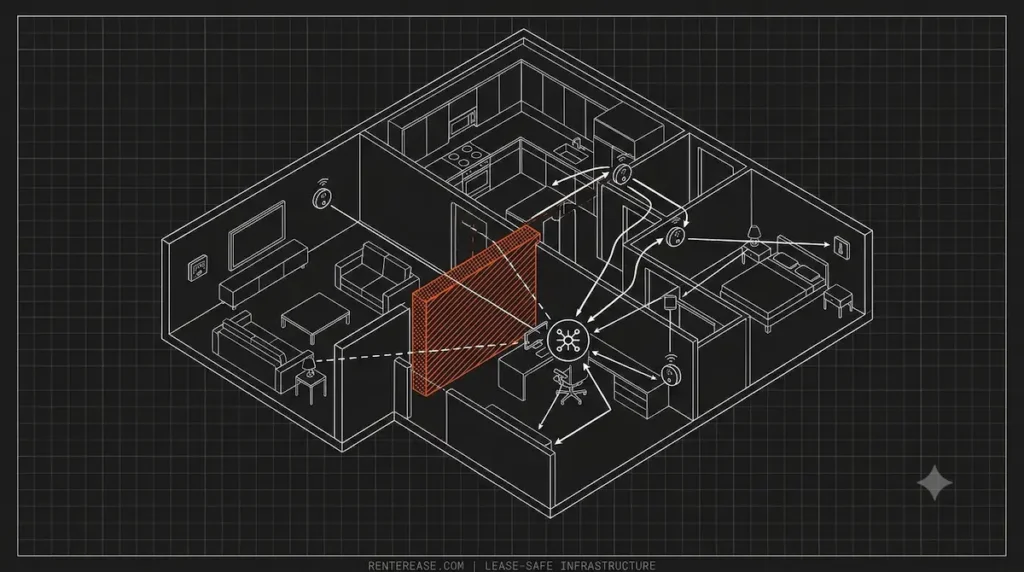
Designing a highly automated living space inside a residential rental property used to mean plugging in a few smart plugs and pairing them with a cloud-dependent mobile app. However, the foundational design rules of home automation have undergone a massive shift. High-income software engineers, data engineers, and technical tenants are actively abandoning unpredictable, cloud-reliant smart ecosystems to build completely self-contained, local smart home architectures right inside their apartments.
By utilizing open-source automation platforms like Home Assistant and privacy-first local controllers, you can process device automation logic entirely within your own local area network (LAN). This approach grants you absolute data privacy and keeps your home running seamlessly even if your public internet connection drops entirely.
But the exact second you attempt to deploy a high-performance local edge network inside a temporary apartment floorplan, you hit a frustrating physical barrier. Renters are strictly forbidden from tearing open walls to run low-voltage data lines or installing permanent smart switches behind electrical junction plates.
Managing a local mesh infrastructure under strict lease constraints requires balancing software configurations with real-world physical space management. To build a robust, air-gapped system that preserves your security deposit while maximizing network speed, you must deploy your hardware using non-destructive, modular staging boundaries.
🎨 The Local Edge Deployment Matrix: 2027 Paradigm
| Infrastructure Layer | Legacy Cloud Architecture | Modern Local Edge Architecture |
|---|---|---|
| Automation Controller | Remote Corporate Cloud (AWS / GCP) | Private On-Premises Hub (Home Assistant) |
| Data Command Latency | Variable 500ms – 2000ms (Cloud Ping) | Deterministic 5ms – 15ms (Local Switch Loop) |
| Privacy Security Vector | Continuous Outbound Data Streaming | Air-Gapped, Closed-Loop Offline Storage |
| Physical Installation | Permanent Wall Splicing & Drilling | Modular, Tension-Mounted Mesh Arrays |
1. The Distributed Systems Shift: Local Edge vs. Cloud Latency
Migrating to a local smart home architecture alters how your daily living space processes data packets. In traditional configurations, standard smart sensors rely entirely on outbound internet pathways. When a movement sensor triggers or a door contact opens, that data payload must travel out to an external cloud server, process the command script, and return a return signal just to flip a single light relay. This heavy dependency introduces a massive variable delay known as cloud ping.
You will spot this system lag constantly in unoptimized homes. Walking into a dark bathroom or stepping up to an office workspace often results in a frustrating two-to-three-second delay before the lights react. If your main internet service provider experiences a regional blackout, or if a corporate manufacturer decides to sunset their external servers, your entire home automation matrix instantly crumbles.
A local edge architecture fixes this structural dependency by running your automation engine entirely on a private physical hub. Runtimes processing natively on an on-premises Raspberry Pi cluster, Home Assistant Green, or an isolated server container keep all operational tasks local. By eliminating external routing loops, device commands drop down to a blisteringly fast local switch loop, rendering your automation completely instantaneous.
To ensure your centralized automation engine remains completely stable and runs cool under continuous compute loads, the underlying machine should be staged within a protected environment. If your edge controllers share an enclosure with high-wattage computing towers, read our technical manual on setting up a local AI server home lab to protect your silicon components from heat traps natively. Once your primary automation hub is safely isolated, your next operational milestone is mapping the physical wireless and wired mesh pathways across your entire rental layout.
📥 LOCK IN YOUR APARTMENT INFRASTRUCTURE BLUEPRINTS
Don’t deploy high-density hardware or mesh network nodes blindly. Enter your email address below to join our newsletter and receive the complete, high-resolution RenterEase Spatial Infrastructure Lab Guide (PDF) delivered straight to your inbox.
Inside this single, comprehensive master document, you will instantly unlock:
- APARTMENT DEPOSIT PROTECTION CHECKLIST: Your verified 12-step non-destructive staging manual—detailing anchor depth limits (<2.5 inches), structural load density caps (<80 lbs per 4-foot span), and mechanical pressure validation cycles to protect your move-out walkthrough.
- APPROVED INFRASTRUCTURE COMPONENT FRAMEWORK: Our engineering architectural parameters outlining heavy-duty cavity surface reinforcement, zero-damage axial compression hardware, and anti-torque mounting brackets to handle equipment mass safely.
We value your workspace privacy. We can only guarantee data security as outlined in our guidelines. For a customized spatial answer, contact our staging engineers directly at hello@renterease.com.
2. Matter Over Thread: Mapping the Network Topology in Apartments
Deploying a local smart home architecture requires a communication framework that operates completely independently of standard Wi-Fi traffic channels. In a high-compute rental environment, crowding your standard router frame with dozens of smart switches, sensors, and bulbs creates instant data bottlenecks. To bypass this wireless congestion, modern edge layouts implement the Matter standard as their shared local language, running over a dedicated Thread wireless mesh network topology.
Thread functions as a low-power, self-healing IP-routing network mesh that splits your hardware devices into three distinct structural layers. Battery-powered smart hardware—like door contact blocks and motion triggers—operate as Sleepy End Devices to conserve power. Plug-in smart modules—like wall plugs and smart bulbs—act as Router Nodes that constantly repeat network data packets. Finally, a hardware Thread Border Router bridges the entire offline wireless mesh directly onto your local wired network frame switch.
However, deploying this distributed wireless topology inside a modern apartment complex introduces an immediate structural bottleneck: radio frequency (RF) signal degradation. High-density residential buildings rely heavily on thick concrete subfloors, dense firewall barriers, and metal-shielded drywall pillars. These dense construction materials easily absorb and block high-frequency wireless packets, causing your edge sensors to frequently drop off the mesh or experience data packet loss.
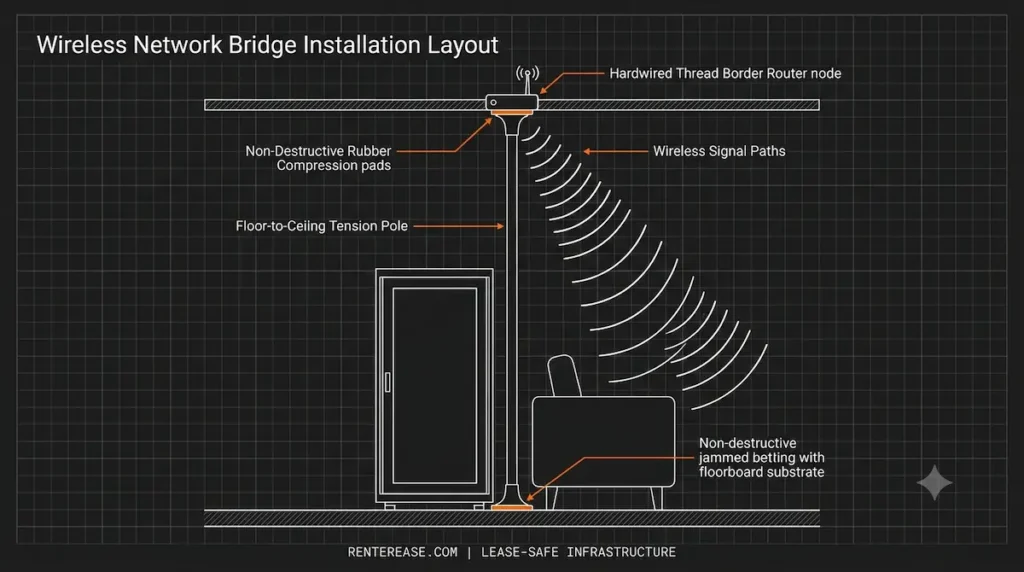
📡 Thread Mesh Spatial Distribution Guide
[BORDER ROUTER (Ceiling Drop)] ──► 15 Meters ──► [PLUG ROUTER 1 (Wall Plug)] ──► 15 Meters ──► [END DEVICE (Desk Sensor)]
▲ ▲
└───────────────── (Self-Healing Backup Path) ───┘
To eliminate these signal dead zones without drilling into your landlord’s walls, you must space your plug-in Router Nodes using strict distance limits. In a typical apartment layout, position a mains-powered smart plug or Matter bulb every 15 to 20 meters down your main hallways. This layout builds a highly redundant network path that automatically routes data packets around thick concrete pillars or heavy metal office furniture.
Furthermore, to maximize your wireless line-of-sight signal path, your core Thread Border Routers should be staged as high off the ground as possible. Placing these sensitive network bridges low on a floorboard or tucked behind a metal server cabinet causes severe signal blocking. To mount your edge bridges safely at optimal ceiling height without driving screws into the sheetrock or risking your tenant security deposit, install temporary vertical poles by following the layout guidelines in our curated manual for the 4 best floor-to-ceiling tension poles for apartment offices.
3. Power over Ethernet (PoE) Backbones Without Wall Damage
While a distributed Thread mesh handles low-power smart sensors with ease, your core infrastructure nodes—such as centralized network access points and Thread Border Routers—require a hardwired backend pipeline. Relying entirely on Wi-Fi links to connect your main automation hub with your network bridges introduces unwanted data latency, jitter, and interference from your neighbors’ wireless routers. Building an elite, local smart home architecture requires a dedicated Power over Ethernet (PoE) backbone to transport power and data over a single unshielded Cat6 cable line.
Using a PoE network switch completely removes the need to plug local edge gateways into bulky AC wall adapters, keeping your setup clean and organized. However, this hardwired strategy introduces a classic rental layout conflict: you are legally barred from cutting holes into the drywall, fishing thick network wires through inner wall cavities, or installing permanent network wall jacks.
Many technical tenants make the critical mistake of letting heavy gauge Ethernet cables run loose across open walking paths or pinning them down using cheap, destructive plastic wall staples. Staples pinch the delicate internal twisted copper pairs, causing immediate packet loss, while the permanent adhesives on cheap plastic clips peel large chunks of paint and sheetrock right off the wall when removed, resulting in expensive move-out repair fees.
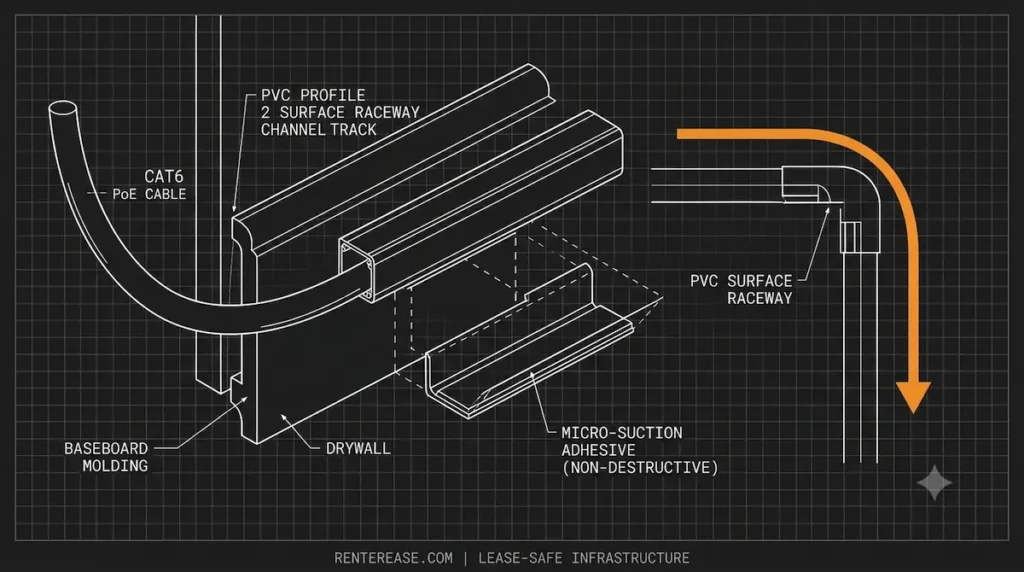
Resolving this structural barrier requires routing your low-voltage PoE data links entirely along the surface perimeter of your baseboard trim casing. You must run your cables through rigid, high-capacity tracking lines equipped with lease-safe, non-destructive backings. To clean up your visual line clutter and guide thick data trunks safely across room thresholds without risking your move-out inspection, select an optimized surface track system by reviewing our blueprint guide for the best renter safe cable raceway setups for high-compute home offices.
4. Managing Low-Voltage Idling Budgets and Smart Relays
Transitioning your apartment to a completely local smart home architecture requires installing smart relay modules—such as Sonoff, Shelly, or Eve micro-switches—directly inside your wall junction containers. These compact units sit behind your physical switch plates, allowing you to intercept local electrical lines without changing the original room aesthetic. To preserve tenant safety, you must configure these modules in unlinked or detached relay modes. This detaches the internal power relay from the physical toggle, allowing smart routines to run continuously while ensuring manual switches behave purely as data-link triggers for your Home Assistant hub.
However, scaling an offline automation mesh across multiple rooms forces you to confront a strict physical layout limit: your rental’s cumulative parasitic load footprint. While a single smart relay or low-voltage Zigbee/Thread gateway draws very little energy, stacking 40 to 60 smart switches, ambient light bars, and multi-sensor matrices creates a continuous, always-on baseline drain known as an idling budget.
Traditional tech articles treat smart accessories as zero-amp devices, entirely ignoring how collective standby currents affect small apartment lines. When your edge automation hub, local servers, and network switches draw continuous current 24/7, they chip away at your circuit’s overall continuous headroom limits. Under the National Electrical Code (NEC), residential branch circuits must respect a strict 80% continuous safety load cap, leaving you exactly 1,440 watts of available operating room on a standard US 15-amp line.
🧮 Continuous Electrical Load Allocation Module
[SHARED 15-AMP CIRCUIT] ──► Max Safe Continuous Load Room: 1,440 Watts
├── 🖲️ IoT Standby Idling Budget (40+ Nodes): 120 Watts
├── 🖥️ Active Workstation & Displays: 750 Watts
└── 🔋 AVAILABLE SPARE CAPACITY RUNWAY: 570 Watts
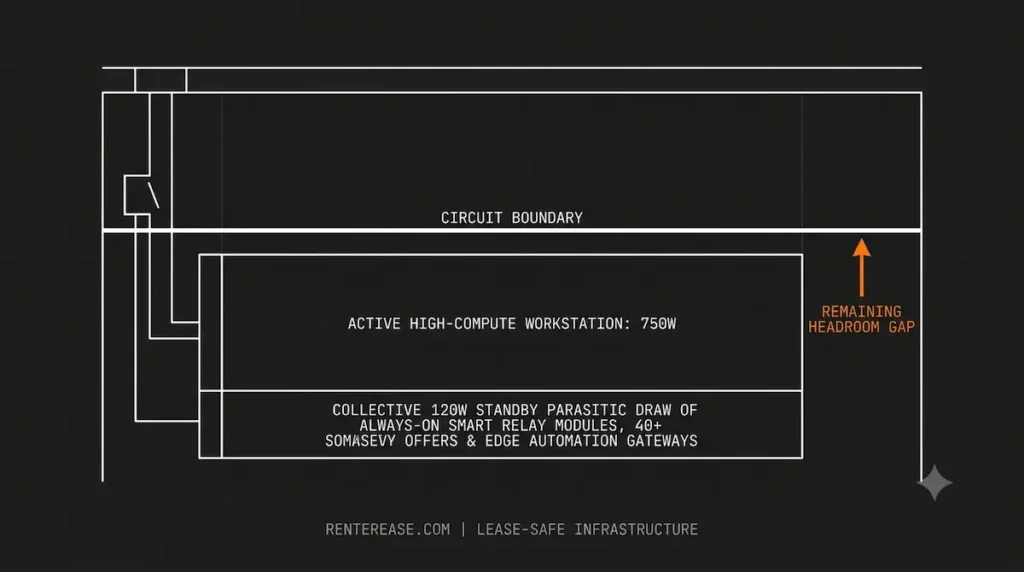
To keep your apartment workspace safe from circuit overload and prevent sudden power dropouts, you must calculate your electrical capacity with absolute precision. Before hooking up a dense mix of high-TDP compute hardware and multiple smart home nodes to a single outlet loop, use our custom home office power load calculator to verify your available circuit headroom.
Additionally, leaving an advanced local smart hub exposed directly to unconditioned residential wall power carries severe operational risks. Subtle utility voltage drops or sudden line spikes can instantly crash your edge gateway, corrupting your automation database files and wiping out your custom YAML configurations. To protect your system against sudden grid sags and ensure your primary smart home hub has a clean, uninterrupted power reserve, route your main power lines through a line-interactive battery core chosen from our manual of the best uninterruptible power supply for apartment home lab deployments.
About the RenterEase Home Automation Lab
The RenterEase Home Automation Lab is a specialized, independent infrastructure collective dedicated to engineering reliable, local-first smart home network topologies inside high-density residential rental properties.
We bypass generic retail smart home reviews to deliver fact-checked, non-destructive physical hardware staging workarounds for remote software engineers, data professionals, and systems architects. Every wireless mesh spacing rule, low-voltage Power over Ethernet (PoE) backbone layout, and continuous parasitic load calculation we publish is verified using real-world testing parameters to safeguard your data sovereignty while fully protecting your landlord security deposit.
To learn more about our testing methodologies, signal-isolation staging labs, and editorial curation policies, read our full About RenterEase operational mission manifest.
Affiliate Disclosure:
RenterEase is an independent, technical workspace infrastructure journal. When you deploy hardware nodes or local edge hubs through the verified tracking links across our manuals, we may earn a partner affiliate commission from the merchant at completely zero additional cost to your equipment cart. We independently test, audit, and mathematically measure every Power over Ethernet (PoE) backbone module, Thread border router, and smart relay variant to safeguard your data privacy while fully preserving your rental lease agreement parameters. For full data mappings, review our official platform Affiliate Disclosure manifest.
Technical Safety & Workspace Disclaimers
The future-focused spatial layouts, low-voltage power metrics, network topology guidelines, and hardware isolation thresholds detailed across this manual are compiled strictly for general educational, archival, and informational research purposes only. For a full data mapping of our global compliance parameters, electrical safety criteria, and user responsibilities, review our comprehensive RenterEase Terms of Use & Product Liability Disclaimers documentation portal.
Assembling distributed IoT mesh systems, Power over Ethernet hardwired networks, and localized smart relay switch arrays inside standard residential rental properties carries inherent operational and electrical risks. These variables include unexpected branch circuit overloads under local building regulations, micro-voltage signal corruption, and continuous structural line strain on old wall outlets.
To eliminate structural infrastructure hazards and mitigate systemic electrical fire risks caused by continuous low-voltage transformer draws, cross-reference your household load parameters directly with the safety protocols outlined by the United States Fire Administration. The reader bears exclusive liability for independently testing local wall plug amperages, checking internal breaker box capacities natively, cross-checking official electrical product safety recalls via the U.S. Consumer Product Safety Commission, and verifying specific building management lease terms before installing any smart hardware configurations or running local automation hubs.
By interacting with our data feeds, you explicitly acknowledge that RenterEase accepts completely zero financial liability, operational responsibility, or legal accountability for blown breaker switches, damaged low-voltage components, scorched outlet paint, or tenant lease agreement forfeitures resulting from any local smart home layout deployed by a user.
🛰️ JOIN THE SUBFLOOR NODE: DISCLOSURE & DEPOSIT PROTECTION
Running an advanced local automation edge hub or a distributed network mesh inside a temporary apartment complex carries intense lease constraints. Sign up below to join our active engineering community and receive our central platform lead magnet.
You will instantly get our premium documentation PDF containing the 12-point APARTMENT DEPOSIT PROTECTION CHECKLIST and the APPROVED INFRASTRUCTURE COMPONENT FRAMEWORK to ensure your hardware matrix remains 100% landlord-safe.
Pingback: How to Get Ethernet in Another Room of an Apartment Without Drilling
Pingback: 5 Best Floor-to-Ceiling Tension Poles for Apartment Offices (2026 Picks)
Pingback: Local AI Server Home Labs: The Ultimate Safe Apartment Guide
Pingback: Best Renter Safe Cable Raceway Setups for High-Compute Home Offices