RenterEase is reader-supported. When you buy through links on our site, we may earn an affiliate commission. Learn more
Managing continuous multi-GPU computational power loads presents a severe thermal challenge inside residential rental properties. The exact second your hardware architecture crosses a continuous 1,200-watt threshold load, traditional air ventilation setups bottleneck. If you want to scale up high-TDP clusters safely, you must deploy a dedicated server liquid cooling home lab setup. Before routing liquid plumbing lines through your room, ensure you balance your electrical load limits using our foundational manual on deploying local AI server home labs to protect your equipment and your complete apartment security deposit.
Establishing a Server Liquid Cooling Home Lab in Small Workspaces
Loading a server chassis with multiple high-VRAM graphics cards draws intense electrical current while generating extreme heat signatures. To keep dense server chips from reaching thermal limits, stock server fan arrays must spin at 10,000+ RPM, emitting a piercing, high-frequency 65+ decibel scream that makes working in the same room impossible.
Worse, you cannot line your closet walls with cheap studio acoustic foam sheets or egg-crate foam. Hot enterprise equipment running continuous computational loads creates an immediate fire hazard when surrounded by cheap, combustible polymers. If you try to block the air vents to suppress the sound, your CPU and VRAM temperatures will skyrocket past safe thermal boundaries within minutes, causing severe thermal throttling, system drops, or permanent component degradation.
As an apartment renter, you face an additional constraint: boring holes through structural drywall sheets or window trim frames to vent heat or run massive exhaust ducts violates your lease agreement, risking your security deposit. The ultimate solution is a closed-loop external hydro-thermal array. You keep the computing cluster dead silent inside the room, while routing flexible coolant lines out to a non-destructive window radiator system. This manual provides the exact material specifications, physical staging rules, and safety calculations to build an uncompromised setup cleanly.
1. The Thermal Wall: Why Air Cooling Fails Next-Gen Home AI Labs
To fix the noise and heat footprint of an enterprise home lab server, you must separate your environment into two distinct problems: airborne high-frequency noise and structural kinetic heat rejection . While basic decibel anomalies can often be suppressed at a lower budget threshold using a specialized home lab server fan quiet manual to initialize software speed caps, standard air cooling hits a hard physical boundary when continuous multi-GPU processing cycles execute . Silicon components operating under continuous model training loads act exactly like industrial space heaters .
The Decibel Storm vs. The Bedroom Heat Trap
Operating a closed server chassis inside a tight WFH bedroom rapidly turns the room into a thermal trap. A typical multi-GPU rig requires massive continuous airflow to dissipate core heat properly. Running this payload in a sealed apartment room will raise the ambient air temperature by 15 degrees Fahrenheit in under two hours.
Recycling hot ambient room air back into the chassis forces your system to downclock performance parameters to prevent core component meltdowns. Standard enterprise server rooms handle this thermal load using aggressive ducted subfloor ventilation grids. As a renter, you must deploy an entirely different strategy.
To process data safely at scale, you must separate the hardware computing zone from the physical heat rejection point. Liquid cooling allows you to capture raw thermal energy right at the water block interface and pump it completely away from your living envelope before it transfers into the room.
2. Renter-Safe Hydro-Staging: The Window-Mounted External Radiator
The core architecture of an apartment-compliant liquid loop relies on moving the heat exchanger completely out of the computing frame. Instead of mounting fans and small copper radiators inside the server case, you mount a massive industrial cooling block—such as a Watercool MO-RA3 grid array—to a temporary, non-permanent window panel insert.
You run thick, flexible EPDM rubber tubing from your server blocks across the room to the window. EPDM rubber is essential because it contains zero plasticizers, meaning it will never leach chemical residue, lose flexibility, or crack under high coolant temperatures over months of continuous deployment.
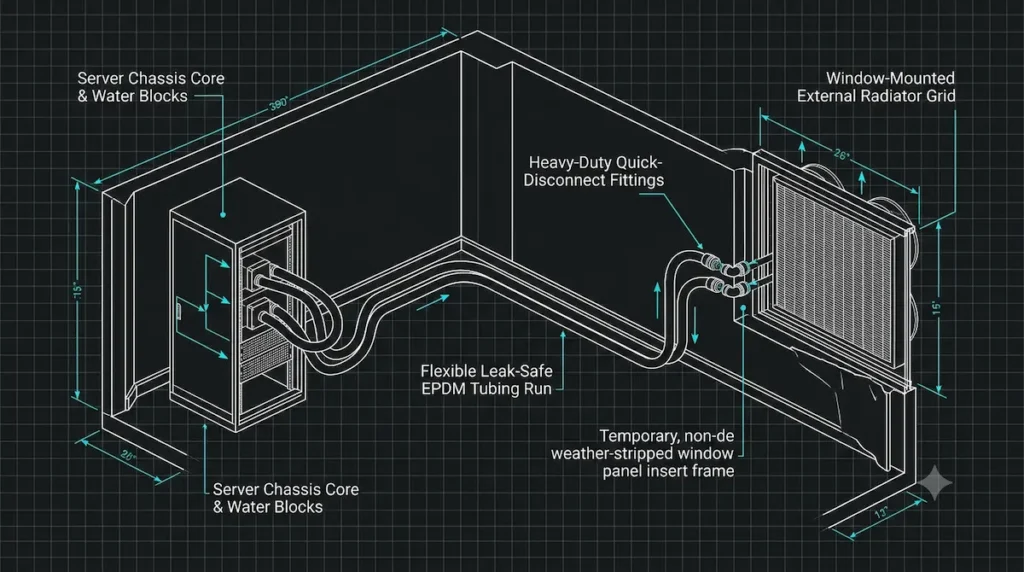
       RENTER-SAFE LIQUID COOLING PATHWAY
┌──────────────────────────┐      ┌──────────────────────────┐
│ INSIDE THE ROOM          │      │ AT THE APARTMENT WINDOW  │
├──────────────────────────┤      ├──────────────────────────┤
│ • Server chassis core    │ ───► │ • Non-destructive panel  │
│ • Silent water blocks    │      │ • External radiator grid │
│ • Quick-disconnect tubes │ ◄─── │ • Heat dumped outdoors   │
└──────────────────────────┘      └──────────────────────────┘
Deploying a server liquid cooling home lab framework allows you to route flexible EPDM rubber tubing cleanly along baseline wall trims. Bridge the connection using dry-break quick-disconnect couplings.
Bridge the connection between the indoor chassis and the outdoor lines using heavy-duty quick-disconnect fittings. These specialized industrial fittings allow you to split the coolant loop instantly with absolute zero fluid leakage. This makes system maintenance, fluid flushes, or moving day completely stress-free without risking water damage to your rental apartment’s floorboards.
3. The Interactive Liquid-Loop Thermal Staging Calculator
This custom calculator widget framework allows you to compute your precise hydro-thermal loop parameters before buying fittings or routing lines. Input your system variables below to clear the infrastructure lock and verify your layout safety metrics.
4. The Fluid Dynamics Threat: Flow Rate Drops and Pump Selection
When you route a coolant loop across an office floor to a window frame, you change the physical fluid dynamics of the system. In a standard computer case, the liquid only travels a few inches through wide tubes. In a renter-safe external hydro-loop, the liquid must travel through 10 to 15 feet of flexible tubing and pass through multiple restriction points like quick-disconnect fittings.
This extended physical distance creates massive frictional resistance inside the line. This resistance drops your system’s volumetric flow rate significantly. If your flow rate drops below 1.0 Liter per Minute (L/min), the liquid cannot move heat away from the copper water blocks fast enough. As a result, the coolant inside the server chassis will hit its boiling point, causing local thermal pockets that can warp your graphics cards or crack your silicon chips.
Managing Head Pressure Obstacles
To overcome this flow restriction, you cannot use cheap, low-power internal PC pumps. You must deploy dual Xylem D5 PWM pumps running in a strict serial configuration.
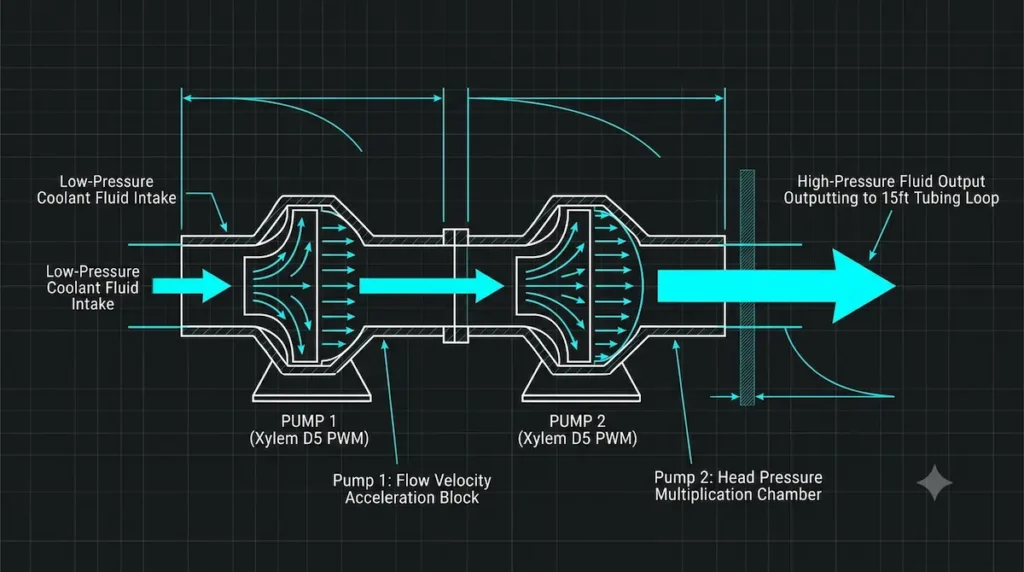
       SERIAL PUMP FLOW ADVANTAGE
┌───────────┐      ┌───────────┐      ┌─────────────────────────┐
│  PUMP 1   │ ───► │  PUMP 2   │ ───► │ HIGH HEAD PRESSURE      │
│ Adds flow │      │ Multiplies│      │ Pushes fluid through    │
│ velocity  │      │ pressure  │      │ 15ft of restrictive lines│
└───────────┘      └───────────┘      └─────────────────────────┘
Placing two pumps back-to-back in a row does not double your top flow rate, but it doubles your total head pressure capability. This pressure is what forces the coolant through long lines, tight fittings, and external radiator fins cleanly. Running a dual pump setup also gives you immediate system redundancy. If one pump experiences a mechanical motor failure mid-training run, the second pump maintains enough pressure to keep fluid moving, preventing a catastrophic hardware meltdown.
5. The Condensation Hazard: Balancing Dew Points in Winter Loops
Venting heat out of an office window casing works perfectly in the summer months, but running a high-compute server liquid cooling home lab loop during winter introduces immediate line sweating hazards.
If the outdoor temperature drops to 35°F (1.6°C), the massive external radiator grid will cool your liquid down significantly. When that ice-cold fluid flows back through the rubber tubes into your warm 72°F (22.2°C) room, physics takes over. The warm, humid air inside your office hits the cold surface of the tubes and server water blocks, instantly forming raw water droplets on your components.
       THE WINTER DROPMELT HAZARD
   Cold Outdoor Liquid (35°F)  ───►  Enters Warm Room (72°F)
                                           │
                                           ▼
                                 Water Droplets Form
                                 Directly on Live Circuits
                                           │
                                           ▼
                                 Catastrophic Board Short
The Condensation Safety Rules
To run a high-compute local lab safely during cold seasons, you must track your room’s local Dew Point Temperature. If your coolant fluid drops below this temperature line, the system will sweat water. Because high-density computational staging environments heavily mimic the specialized environmental envelopes found in industrial data centers, verifying your moisture control boundaries against established institutional efficiency mandates, such as the U.S. Department of Energy (DOE) Data Center Energy Efficiency Standards, ensures your continuous hydro-loop deployment remains safe, legal, and structurally optimized. Implement these safety parameters immediately .
To run a high-compute local lab safely during cold seasons, you must track your room’s local Dew Point Temperature. If your coolant fluid drops below this temperature line, the system will sweat water. Implement these safety parameters immediately:
- Active Flow Regulation: Use your software terminal to lower your external radiator fan speeds when outdoor temperatures drop, ensuring your liquid temperature never drops below 65°F (18.3°C).
- Insulation Sleeves: Wrap all internal EPDM rubber tubing sections located inside the room with thick closed-cell neoprene foam insulation sleeves to keep humid room air away from cold tube lines.
- Automated Kill-Switches: Connect a digital room hygrometer directly to your server’s bash daemon script. Configure the script logic so that if the coolant temperature drops within 3°C of the local room dew point, the loop automatically powers down your graphics cards to keep the system dry and safe.
6. System Hydro-Staging Manifest
Use this quick-reference data matrix to verify your liquid cooling loop parameters against your specific apartment building limits before configuring your lines:
| Mitigation Level | Staging Components | Target Thermal Delta | Primary System Risk | Lease Compliance Rating |
|---|---|---|---|---|
| Tier 1: Serial Flow | Dual Xylem D5 PWM Pumps running in a continuous row profile. | 5°C – 8°C Core Drop (High Velocity). | Frictional pressure drop if line loops kink. | Elite (100% Safe): Hardware changes remain isolated entirely inside the server chassis frame. |
| Tier 2: Heat Dump | MO-RA3 Radiator Grid on a drill-free window panel insert. | 15°C – 25°C Room Drop (Maximum Cool). | External weather seal leaks during heavy storms. | Excellent: Free-standing structural load that requires no drywall screws or permanent building modifications. |
| Tier 3: Climate Sync | Neoprene sleeves synced to active room dew-point daemons. | Dynamic Prevention (Sweat Control). | Internal line condensation if ambient temperatures drop. | Elite (100% Safe): Programmatic software script safety loops require zero room staging modifications. |
Download the Spatial Infrastructure Master Pack
Running high-density server nodes inside standard residential rentals requires strict physical protection rules to safeguard your tenant security deposit. Before executing motherboard software overrides or altering cooling component wiring harnesses, ensure your workspace is fully decoupled and optimized for safety.
Managing high-velocity thermal fluid loops, serial pump head pressures, and window-mounted heat dumps will successfully isolate your home laboratory footprint. However, long-term computational staging requires strict physical protection rules to remain completely safe inside a rental property. Do not risk structural settling, wall scuffing, or localized drywall fragmentation under heavy hardware loads over time.
Claim your copy of the official 4-page Spatial Infrastructure Lab Manual to instantly secure the 12-Point Apartment Deposit Protection Checklist and Approved Infrastructure Component Framework. Lock down live manufacturer registries, certified tool listings, and non-destructive move-out restoration techniques natively.
Enter your email address to download our official 4-page technical manual, containing:
- The 12-Point Apartment Deposit Protection Checklist: Concrete operational safety rules—including the 15-mm Rubber Neoprene Buffer Matrix—to fully isolate high-frequency equipment vibrations.
- The Approved Infrastructure Component Framework: Certified mechanical specifications for floor-to-ceiling axial compression columns, hollow-wall anchors, and weight density span limits to bypass fragile walls entirely.
Claim your copy of the official 4-page Spatial Infrastructure Lab Manual to instantly secure the 12-Point Apartment Deposit Protection Checklist and Approved Infrastructure Component Framework. Lock down live manufacturer registries, certified tool listings, and non-destructive move-out restoration techniques natively.
About the RenterEase Infrastructure Staging Lab
This manual was engineered through a comprehensive physical and thermodynamic systems audit conducted by the RenterEase Workspace Infrastructure Staging Lab . To solve a major operational challenge for modern technical remote operators—housing enterprise-grade local AI hardware arrays and dense computing clusters without altering structural apartment property grids—we completely bypass superficial consumer lifestyle decor trends .
Instead, our staging team analyzes real-world fluid mechanics, serial pump pressure curves, residential continuous power tolerances under the National Electrical Code (NEC), and localized room condensation dew points . By cross-referencing multi-GPU hardware profiles against standard lease compliance terms, this platform provides an uncompromised, renter-safe architectural framework designed to protect your premium computational assets and ensure your complete tenant security deposit remains 100% secure at move-out time .
Affiliate Disclosure & Hydro-Procurement Policy
RenterEase is a data-dense, reader-supported platform built on absolute structural transparency . When you deploy enterprise-grade liquid cooling assets, dual-pump serial infrastructure blocks, line quick-disconnect fittings, or non-destructive external window radiator mounts through the curated tracking links across our technical manuals, we may earn a localized referral commission from our retail partners at completely zero additional cost to your account .
Our hardware evaluation engine operates with absolute editorial independence . We exclusively highlight heavy-duty acoustic isolation mounts, certified fireproof plumbing components, and low-thermal fluid management systems that satisfy our strict independent engineering standards for residential safety and landlord-compliant property restoration . These small commissions directly fund our independent mechanical testing lab operations, allowing us to continue building advanced, zero-damage spatial layout blueprints for high-compute remote operators . Learn more about our property liability parameters in our global Terms of Use & Product Liability Disclaimers.
Master Technical, Safety, & Hydro-Thermal Staging Disclaimer
The mechanical blueprints, liquid-loop schematics, fluid dynamic calculations, pressure drop metrics, and coolant parameters detailed across RenterEase (including all manuals, articles, and interactive calculation tools) are compiled strictly for general educational, historical, and informational research purposes .
The deployment of custom liquid cooling loops, external radiator grid arrays, serial pump assemblies, and coolant lines within residential properties carries inherent physical risks, including but not limited to structural water leaks, material degradation, component short circuits, and severe system overheating . The reader assumes absolute, exclusive liability for verifying physical hose connections, load-bearing capacities, electrical breaker tolerances under the National Electrical Code (NEC), and building thermal envelopes .
RenterEase, its laboratory staging editors, and its parent corporate entities accept completely zero financial liability, operational responsibility, or legal accountability for hardware failures, destroyed motherboard silicon, fluid spills, internal line condensation moisture damage, tripped breakers, or tenant security deposit deductions incurred during independent workspace modifications . Make sure to double-check the physical labels, safety parameters, and manufacturer instruction guides on all plumbing fittings, pumps, and water blocks before initializing any live fluid cycles.
Pingback: Local AI Server Home Labs: The Ultimate Safe Apartment Guide